

Your CV must reflect your ability to resolve hardware and software issues, provide technical support, upgrade operating systems and use diagnostic tools. Use your CV to demonstrate the skills, experience, and value you can bring to the table.
IT Support that means being passionate about technology and ready to shape your future in IT. Therefore, mention you can not only ensure operational efficiency but also minimise downtime.
Make sure that the final draft not only aligns with the recruiter’s expectations but is also easy to read and digest. The reality is that only a targeted bespoke CV will do, so read the job description to get an idea of the role’s requirements and the company’s culture and values.
By: Iejaz Uddin – Updated: 5 February 2026
Page overview
- IT Support CV example
- How to write a IT Support CV
- CV structure
- Contact details
- Personal summary
- IT Support work experience
- Skills
- Education section
IT Support CV example
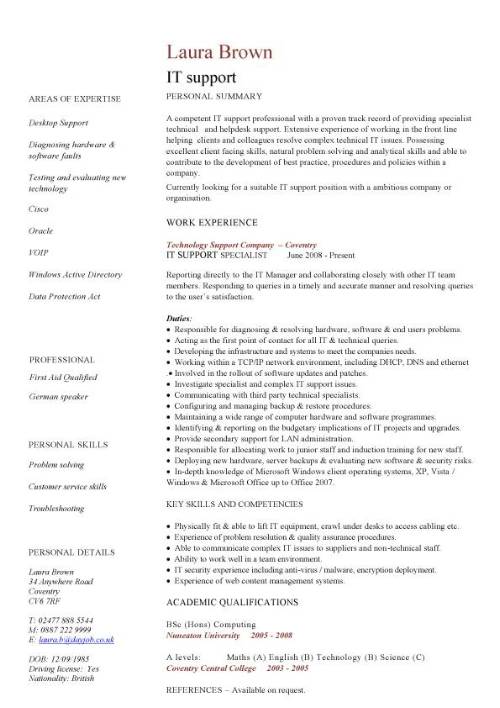
How write a IT Support CV
A IT Support is responsible for ensuring a company’s technology infrastructure is secure, efficient, and future ready. You have to show the recruiter you have a logical and methodical approach to work and an ability to work in high-pressure situations.
When writing your CV, try to keep it short and to the point, ideally no more than two sides of A4 if possible. Always use black text in a readable font size of between 10 and 12 in Calibri, Arial, or Times New Roman. Go for a simple layout and use clear headings and bold text, italics, spacing, or underlining to make it easy to read and break up large blocks of text.
On a personal level, explain that you not only have practical experience and relevant qualifications but also a desire to self learn and ability to find creative solutions to problems. Tell them you have a proactive attitude and are always looking for ways to expand your skill sets and are eager to learn, adapt, and take on more responsibility.
When writing your CV show you can:
- Install, maintain and repairs a company’s computer hardware, software, and network infrastructure.
- Ensure that network security is maintained through the use of passwords and multi-factor authentication (MFA).
- Assess complex situations and make well-informed decisions.
Guide overview:
- CV Structure
- Contact details
- Personal summary
- IT Support work experience
- Skills section
- Education
- Hobbies and interests
CV Structure
Do not underestimate the value of a well laid out and organised CV. Not only will it make you look more professional, it will also present what you have to say more clearly and make much more easier for employers to quickly spot your strongest points.
The best way to do all of this is through a chronological CV format, which will present your work experience and other information in reverse order, starting with your current or most recent position and then work backwards. This design will also highlight your career progression, any promotions you’ve achieved and help employers see how your experience and skills have developed over the years.
Contact details
Your aim should be to make it as easy as possible for recruiters to reach you by having your most recent correct contact details at the top of your CV. The header is the perfect spot this, as it’s above all the other sections and the first thing anyone sees.
Although these may seem like a small detail, this section is at the centre of introducing yourself and being invited to an interview. Remember is you can’t be contacted you’re wasting your time.
At the very least, include:
- Your full name
- Phone number
- Email address
- Your current job title (if it’s relevant)
You can also include links to professional profiles, like LinkedIn, but only if they’re current and match the details in your CV. If they’re out of date, it’s better to leave them off.
IT Support CV Personal Summary
A personal profile as it is also known is an introduction to your CV and a taster of what you’re all about. It is a short paragraph of no more than 150 to 180 words that sits above everything else. This career statement is your chance to quickly give recruiters an outline your most relevant skills, experience and ambitions.
Points to mention in your summary:
- Your ability to ensure seamless operations across various IT platforms.
- Proven past experience in technical support or IT support roles.
- Having a problem solving mindset along with the analytical skills needed to diagnose and resolve technical issues efficiently.
- Possessing the patience required to listen and empathise with non-technical employees and clients who have issues with their computer systems.
IT Support Work Experience
This is where you bring your current and past work experience to life. It’s here that you tell the reader about the roles you’ve held and what you’ve achieved. When writing about your previously jobs give the company name, job title, and the dates you worked there. Tell them about you your day-to-day responsibilities, achievements and the end results.
Duties to include in your CV:
- Providing first-line technical support via help desk tickets, email, or phone.
- Owning the toughest problems and seeing them through to the end.
- Handling escalations from 1st and 2nd Line teams.
- Carrying out all requests and duties as directed by your line manager.
- Serving as the first point of contact for IT support within the organisation.
Skills section
As an IT Support you will on a daily basis you will use a broad range of hard and soft skills. To be successful you have to include these in your CV. The best place to find the skills to include in your CV, is in the actual job description. The recruiter will list everything here. Once you know what skills an employer is looking for, simply include these in your CV and tailor it to match the job itself.
Skills to show in a IT Support CV:
User support
- Assisting users with hardware, software, and network issues.
- Creating secure accounts.
Hardware configuration
- Helping set up new equipment, updating existing networks and finding ways to improve existing processes.
- Testing new hardware and software before full-scale installation
- Installing new IT systems and upgrading existing ones.
Communication
- Confidence in communicating with people and understanding their IT concerns.
- Providing an approachable, friendly service to customers and clients.
- Can show people how to use new software, both face-to-face and online.
- Able to speak to all levels of staff including senior management.
Problem solving
- Owning and resolving complex tickets from the service desk, ensuring timely fixes and great customer experience.
- Ability to prioritise tasks, manage workloads effectively, and drive resolutions in a fast-moving environment.
- Identifying, diagnosing and troubleshooting key issues that are at the core of affecting the operation of a company’s IT infrastructure.
Team player
- Supporting other technicians through guidance and collaboration.
- Able to work as part of a diverse group of professionals.
Network support
- Maintain and support computer networks, including LAN, WAN, VPNs, DNS, TCP/IP configurations,
Education section
To become a IT Support specialist you need certain qualifications and accreditations. This is the part of the resume where you list these. It’s also the place where you demonstrate your commitment to learning, growing academically, and staying current in your field.
When giving details of any school, college, or university qualifications, include the course title, the qualification or certificate earned, the name of the institution, and the dates. Try to prioritise the qualifications that are most relevant to the job you’re applying for.
1st line support CV example
IT support analyst CV example
IT support engineer CV example
IT support technician CV example
ICT technician CV template example
More IT related links