

A well written CV is an essential component of any job application, providing hiring managers with a concise overview of your career trajectory, experience, and skills.
It’s therefore imperative that it reflects not only your dedication to the position and desire to get the job but also your ability to carry out any said duties. In addition to all of this it has to highlight your professional development, and potential for future contributions to the role itself. In relation to the Systems Administrator position, your CV must effectively convey your ability to make sure an organisation’s computer systems are functioning and meet the needs of the organisation.
This guide will walk you through the process of creating a Systems Administrator CV that not only meets the expectations of hiring managers but exceeds them.
By: Iejaz Uddin – Updated 12 October 2025
Page overview
- Systems Administrator CV examples
- How to write a Systems Administrator CV
- CV structure
- Contact details
- Personal summary
- Systems Administrator work experience
- Skills
- Education section
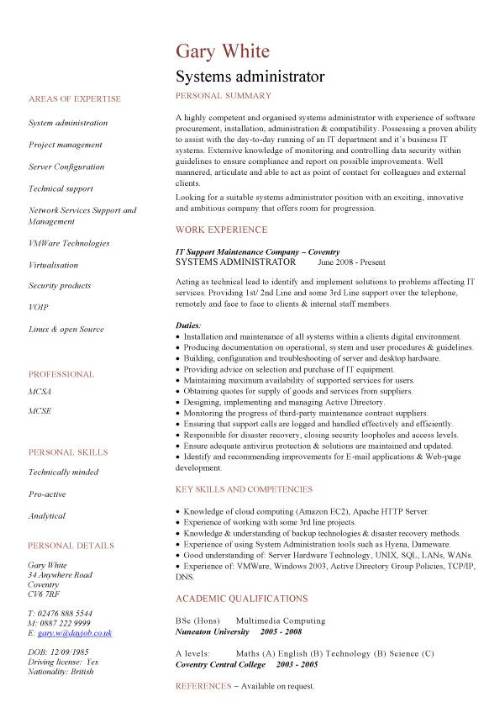
Systems Administrator CV example
Sign Up
Get immediate access to over 1000 + Premium CV templates.
All for ONLY $4 a month.
100’s stunning designs that will make you STAND OUT and highlight your Skills and Expertise.
With all our Premium templates you will get the fully editable MS Word;
- One page version.
- Two page version.
- Matching cover letter.
All you need to do is simply enter your personal details into the ready made text boxes and within minutes you will have a professional CV.
Unlimited downloads – Money back guarantee – Cancel anytime.
How write a Systems Administrator CV
Spending time learning how to create an effective CV will vastly increases your chances of getting to the interview stage.
A Systems Administrator CV is a two page document that details the working life, achievements and strongest points of any would be candidate. It shows potential employers how an applicant will deal with issues such as managing and maintaining IT infrastructure, including servers, networks, and software.
Start off by making a list of everything you want to include in your CV. For instance, make a list of your previous employment, key responsibilities that may be relevant to the job you want, as well as your educational background, qualifications, and skills. Then filter these down further to ensure you only have those that are relevant to the vacancy.
One way to do this is to carefully analyse the job description to identify the experience, qualifications, and skills the employer is seeking. Once you understand their requirements, you ca then review your own background to determine if you can meet them, and then insert these in your CV.
Guide overview:
- CV structure
- Contact details
- Personal summary
- Systems Administrator work experience
- Skills section
- Education
- Hobbies and interests
CV structure
Go for a simple structure that is easy to scan, easy to read and where your strongest points stand out in a glance. You want something that demonstrated you are an organised person and the best way to do this is through a layout that is as sharp and engaging as the content itself.
Remember that if you CV looks clean, well-organized, and professional, it will create an immediate positive impression of you as a jobseeker and highlight your communication skills, organizational ability, and attention to detail. All qualities employers value in candidates.
Use a standard reverse-chronological layout that begins your name and contact details, followed by a personal summary, then your work experience, education, and skills section. Each section has to be clearly delineated, allowing a hiring manager to quickly access key information. Through distinct sections you can ensure easy readability and navigation.
This is how to structure your Systems Administrator CV:
- Name and contact details
- Personal profile
- Key skills
- Work experience
- Education
Contact details
Located at the very top of your CV is your contact details, which give the hiring manager information on how to contact you. The more options you give them the better. This section is your personal introduction and a way of saying, “Hello, pleased to meet you,” followed by a confident handshake.
As a rule do not give your work email or telephone number and ensure that your email addresses is formal and professional. By including your location you are showing the employer that you live in a suitable location to commute to the job. Only your city, and your country if you’re applying internationally.
Have a job title under your name, and it’s a good idea to have this as the same as the job you are applying for. By doing this you further cement your suitability for he role in these of reader.
Finally, double-check everything you write down carefully for spelling or formatting errors. A small mistake can make you unreachable and cost you a lost interview opportunity.
At the very least, include:
- Your full name
- Professional title
- Phone number
- Email address
- Your current job title (if it’s relevant)
Systems Administrator CV personal summary
Below your name and contact details goes your personal summary, or career statement as it is also known. Its here that you in a few short sentences encapsulate who you are and hopefully spark some interest in the recruiter and encourage them to read the rest of your CV. First impressions matter especially on your CV, and this brief but critical paragraph is the first thing that will be read, so it should seductively give a quick overview of who you are.
Through an informative summary outline key competencies and achievements as well as your career ambitions and the unique value you can bring to an organisation. You can also outline your motivations in applying for the job role.
Your main aim is to capture the reader’s attention from the very first sentence, make them want to keep reading and discover more about what you have to offer.
Systems Administrator work experience
Illustrate your work experience and career progression through this section. It’s here hat you can outline your employment journey though your current and past jobs and also tell the story of your professional growth and development.
When doing this include the employer’s name, dates of employment, and your key responsibilities and achievements. Highlight those tasks and past duties which are relevant to the job you are applying for.
Give more space and place extra emphasis on your current or most recent roles as potential employers are more interested in what you are doing now, rather than what you were doing a decade ago.
Show your ability to:
- Manage and maintain IT infrastructure to ensure optimal performance.
- Troubleshoot and resolve IT-related issues efficiently.
- Monitor system performance and identifying potential issues to ensure smooth operation.
- Familiarity with hardware and physical devices such as servers or printers.
- Perform routine and scheduled audits of all systems, including backups.
Skills section
Beneath the work experience goes your skills section, which is where you list those hard and transferable soft skills that can help you in the vacancy. For a Systems Administrator role that means things like being able to analyse and resolve hardware, software related issues.
Skills reflect the competencies you’ve developed through education, training, and professional experience. This is a great opportunity to further strengthen your application and show recruiters the added value you can bring to their operations.
Employers pay close attention to those key skills that directly relate to their job requirements, as they can provide clear evidence of your ability to perform your duties effectively. Therefore, focus on those skills from your repertoire that best match the needs of the role as listed in the job description.
Skills to show in your CV
- Excellent communication, time management, and problem-solving skills.
- Able to work on-call and occasionally outside normal business hours according to business needs.
- Have exposure to the latest technology and software.
- Communicate technical information to both technical and non-technical staff.
- In-depth knowledge of operating systems such as Windows, Linux and Mac.
- Knowledge of maintenance, upgrades, configuration, and installation of laptops, mobile devices, and desktop systems
Education section
Every CV for a Systems Administrator role must have an Education section where the candidate should list their qualifications, training, and certifications.
The best way to do this is to review your academic background carefully and identify those qualifications which align closely with the position you’re applying for. These are the ones that you should prioritise and place prominently. In addition to this highlight relevant coursework, projects, or publications that demonstrate your expertise in your chosen field.
More IT and technology based CV templates: